


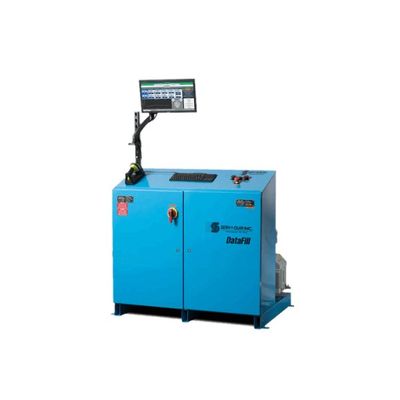
Serv-I-Quip DataFill - A/C Fill System
The DataFill A/C Fill System is a unique package that combines a high quality, full featured a/c charging system with a powerful production, quality, and process control program. DataServ has become a critical component for measuring quality and process improvement. This software provides web based remote access to system configuration, bar code and model configuration, production data, calibration, password management, PC and PLC programming updates, troubleshooting, production scheduling and maintenance scheduling.
The new DataServ 3.0 release offers increased functionality and introduces a new Dashboard that can display multiple DataServ systems and key production values. Production analysis reports, and an email notification system that delivers process alerts, notifications, or system events are some of the new features.
The core functionality of this system is an industry proven a/c filling process that offers a flexible fill cycle that can include a nitrogen pressure test, pressure decay test, evacuation and vacuum decay test, and a precise oil and refrigerant charge. This process can be followed up by a performance test to verify quality. All process set points and results are monitored and recorded to DataServ.
This system is also available as an ETL Certified, Class 1, Division 2, Group D system to meet the needs of vehicle manufacturers filling HFO-1234YF.
- Automatic process set-up, initiation, cycle completion, and return to standby
- Auto connect/disconnect, high flow pneumatic tooling
- Accurate, dependable, high speed mass flow metering technology
- ± 2 grams charging accuracy
- Charging rates up to 5 oz./sec.
- 8, 16, or 25 cfm two stage vacuum pump
- Allen Bradley PLC machine control integrated with PC O/I, reporting, and communication
- NFPA 70E Arc Flash compliance
- New DataServ 3.0 internet accessible data acquisition and process control software
- Dell PC running Windows 7, 20″ flat screen LCD
- Hand held CCD or RF bar code scanner loads and initiates process
- Back-up Allen Bradley Panelview® Touchscreen Operator Interface
- Installation, Operation, Maintenance, and Troubleshooting Manual
- Spare Parts List
- PLC and HMI machine code with comments
- Electrical and mechanical drawings in AutoCAD
- One Year Warranty
- Oil Fill
- Nitrogen Pressure Decay Test
- Helium Leak Test
- A/C Operation and Performance Testing
- Allen Bradley, Mitsubishi, Toyopuc PLC Controls
- Optional Touchscreen HMI (Mitsubishi, GOT, Panelview)
- ETL Certified, Class 1, Division 2 Systems for HFO filling
- Stop station
- Mobile station
- Base station with track mounted, vehicle towed tool console
- Base station with motorized, VFD, line synchronized, track mounted tool console
Nitrogen Pressure Test
Initial pressure test and pressure decay test used to find large leak failures
Helium sniff leak test
Precise pressure sniff test for critical or persistent leak points
High and low side evacuation and charge
Efficient, quality evacuation ideal for larger volume systems
Refrigerant, oil and additive fill
Address multi oil, specialty oil, or additive filling of A/C systems
Post charge performance test
Measure ambient temperature, suction and discharge temperatures and pressures, analyze and record performance
Combination Fill
Combine two or three fluid fill processes onto one station or overhead console
- Simple track mounted tool balancer
- Swinging boom and tool balancer
- Automatic, air actuated drop and retract balancers
- Multi-axis, automatic tool positioning
- Multi tool, automatic tool positioning
Process Screen
- Product ID #
- Technician ID #
- Base ID #
- Time / Date
- Unit Vacuum (Lvl. and Time)
- Vacuum Check (Lvl. and Time)
- Volume filled
- Pass / Fail Code
- Refrigerant Type
- Total Refrigerant Usage
Set Up Screen
- Set Model #
- Set Model Description
- Rev.#
- Set Author
- Set Press. (Lvl. and Time)
- Set Leak Check. (Time)
- Set Vacuum (Lvl. and Time)
- Set Vacuum Check. (Lvl. and Time)
- Set Refrigerant Volume
- Set Max Cycle Time
Calibration Screen
- Set Calibration Volume
- Set Comments
- Set Refrigerant Type
- Set Refrigerant Pressure
- Set Password
- Calibration History