


- Home
- Companies
- Drew Technologies, Inc.
- Products
- Model RAP 2 - Remote Assist Program
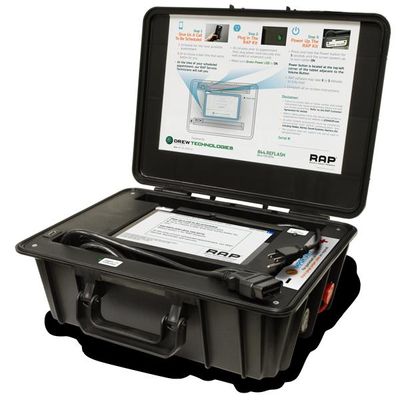
Model RAP 2 -Remote Assist Program
Drew Technologies is the industry leader in vehicle reprogramming; and we understand that J2534 programming can be a difficult task. In 2016, we revolutionized the automotive aftermarket industry with the introduction of our Remote Assist Program (RAP®). Our RAP® team has remotely assisted repair technicians, successfully programming thousands of Asian and domestic vehicles! RAP®2 expands your technician`s capabilities to include European vehicles with the same easy-to-use process! Independent Repair Shop Owners and Technicians trust RAP®2 to: Finish the job correctly, Keep the vehicle in your shop, Increase profits, Increase customer satisfaction
- • Appointments must be scheduled Monday – Friday for a Saturday appointment.
- • Inbound calls will not be received on Saturdays. Only outbound calls will be made to those with scheduled appointments.
- • Appointment scheduling will be available beginning at 9:00am ET with the last appointments being scheduling at 2:00pm ET.
- • Nissan Valve Body/Transmission Programming appointments will be scheduled no later than 1:00pm.
- • All currently supported OEM makes will be supported (GM, Ford, Chrysler, Toyota, Honda, Hyundai, Kia, Nissan).
- • Level 2 Tech Support issues will be pushed to the following Monday for processing.
The RAP®2 kit includes:
- Windows Tablet PC
- An additional hard drive to allow for future expansion as new OE’s are added
- The same trusted J2534 device found in the original RAP®
- 4G Modem* for fast wireless internet access
- Subscription to Diagnostic Network included!
- OEM subscriptions
- A 90–amp battery maintainer** capable of handling European amperage requirements
You no longer need to purchase additional tools or OEM subscriptions to service your customers; and since our RAP® Service Technicians do the programming, outsourcing jobs that you`re not tooled for can be a thing of the past and you can free up your technicians to get higher skilled labor hours in!
1. Give us a call to be scheduled
- Schedule for the next available appointment.
- Or choose a later time that works best for you.
At the time of your scheduled appointment, our RAP® Service Technicians will call you.
2. Plug in the RAP® kit
- Thirty (30) minutes prior to your scheduled appointment time, securely plug the power cord into a wall outlet or an extension cord; and check to make sure the green LED is on.
3. Power up the RAP® kit
- Turn the tablet ON by pressing and holding the power button for 3 to 4 seconds until the screen powers up.
- RAP® software may take 3 – 5 minutes to fully load.
- Complete all on–screen instructions.
Power button is located at the top–left corner of the tablet, adjacent to the Volume button.