Eyegaze Inc.
  1. Companies
  2. Eyegaze Inc.
  3. Software
  4. Flagship Software For Accessing ...

Flagship Software For Accessing Computer

SHARE

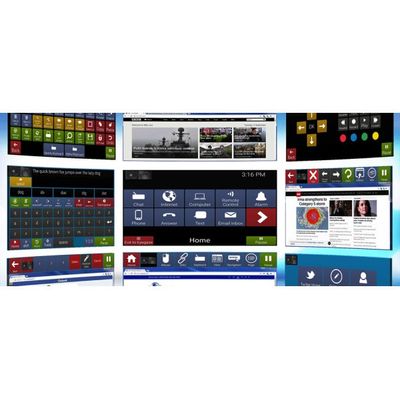
Our flagship software for accessing computer functionality and communication. Included within this suite is almost everything a user would need to do modern computer interactions: Chat, Mail, Phone Text/Calling, Computer Control, Environmental Controls and much more.

Most popular related searches
Home Screen

Home. This is your entry point into Eyeworld 3. From here you can access all of the features included within the software bundle.

The user interface throughout Eyeworld 3 is designed for power users.

  • Dark background colors are used to reduce eye strain.
  • Icons with simple flat design are used to allow for easy identification.
  • Interface elements such as navigation and Eyegaze monitor are always placed at the same spot on each screen.

All of this translates to a software that feels easy to use and reduces cognitive fatigue.

Communication
Communication is the most important aspect of AAC software for Eyegaze users and reaching real time conversation speeds is just as important.

Eyegaze Inc. has invested many hours into fine tuning user interface and communication functionality to ensure the Eyegaze user can reach near live conversation time.

Below are some features that help users communicate with more ease and speed. These aren’t all of them, though—contact us to get the full list!

Word Prediction
The advance Word Prediction learns from the user making guesses based on context given via letters, location and history.
Advanced Text Formatting Tools

Eyeworld 3 comes with text formatting tools that power users have grown to love. You can now type faster, send text to more locations and easily switch between different keyboard layouts.

Phrases
Quick access phrases – create, edit and delete user defined phrases. Phrases enable users to build parts of conversation very quickly, reaching near real time conversation speeds with text to speech. The intuitive user interface allows for quick conversation building.
Notes
Quickly save long notes written in the chat keyboard for retreval at a later time. Some usages include funny stories to share, notes to doctor and long summaries on many topics.
Internet Browsing
Eyeworld 3 comes with a feature rich complete web browsing experience.

This Web Browser was specially designed after identifying the unique issues Eyegaze users face when browsing the internet. Speed, usability and security were major factors in the creation of this web browser.

Below are some features that help users browse the web.

“The entire Web Browsing experience has been redesigned from the ground up, everything you can do with a mouse and keyboard has been remade for Eyegaze input first.”

Based on Google Chrome
Eyeworld Web Browser is a Google Chromium-based Web Browser. It has all the features you’ve come to love in Google Chrome – quick startup times, built in auto updates and access to extension/apps on the Chrome Web Store.

Hyperlink Selection
Selection meethod: after a key is pressed all hyperlinks in the current page view are given a hint overlay.

To select a hyperlink you input the corresponding “hint overlay” combination for the hyperlink you want to be selected. This selection method requires very little in precise eye control, making it ideal for selecting hard to hit hyperlinks on web pages!


Advanced Link Options
Open a link into a new tab, open multiple links in new tabs, copy current page to clipboard and copy link to clipboard!
Mouse Emulation
Dwell near item you want to select, then page will zoom to give you more precise control! This method of clicking hyperlinks gives you mouse emulation where your eyes are, do left-click, double-click, right-click all with your eyes!
Easy Scrolling
Scroll a page with ease! simply look at the key to activate scrolling. Then look away and the page will continue scrolling. Look back at the Eyegaze workspace to stop scrolling.
Type Into Any Text Field
Type in any text area on the internet with your eyes! Dock your keyboard right on top of the text area and type the text you want to enter,
Computer Control
Eyeworld 3 comes with a feature rich complete Operating System integration, giving you complete control of your computer. The ability to navigate native applications with your eyes and control system settings!
Left and Double Mouse Click
Easily left click or double click any item on the desktop regardless of its icon size.
Drag and Drop
Easily drag and drop icons and files with high precision.
Right Click and Complex Sub-Menus
Easily right click and select sub-menus. Have confidence in your ability to use applications that require multiple types of mouse clicks!
Environmental Control
Eyeworld 3 comes with the ability to control radio frequency and near infrared entertainment devices, such as cable TV, Sound Systems, Switches and Lights. Environmental control devices make it easy for the Eyegaze user to control the devices around their house.
“Control many types of devices, customize your layout and fine tune to your liking!” Operate a Remote Control
Operate a DVD Player
Make Calls on the Phone


Supported Environmental Devices

Environment control in Eyeworld 3 is compatible with all of the popular environment control brands, including: 

  • GEWA
  • Eldat
  • EvoAssist
  • IRTrans
  • UUIRT
  • Amazon Echo
  • Web browser based home automation