


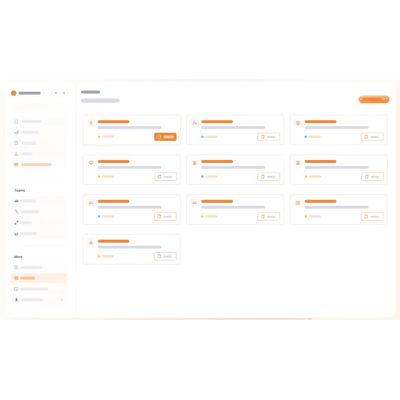
TouchPoint - Gate Activity Register - Every Transaction Captured
That is not a rule. That is compliance. Every vehicle, every courier, every person without an ID, every key issued - if it crosses your gate, if it needs a record. Not a handwritten note that nobody can read or search. A timestamped, categorised, digital entry that proves what happened, when, and who was responsible.
Issuing a permit proves a form was filled. It does not prove the work was safe, audited, and controlled.
- Digital permit with scope, duration, headcount, isolated defined
- SOP selected and enforced per work type
- Safety risk assessment completed and signed off
- Active audit during work - non-compliance captured
- Action taken on every non-compliance - recorded
- Formal close-out with timestamped sign-off
If a vendor causes an incident during project work, you can prove - with a timestamped digital trail - that the correct SOP was triggered, the safety assessment was done before work began, audits were conducted, and every non-compliance was acted upon?

Touchpoint’s work permit system manages the full lifecycle from permit request through SOP selection, safety assessment, automation, active auditing, and formal close-out.
Digital permit captures all of this: headcount, material, zone, and duration defined and enforced before work can begin.
SOP Assigned to work types - fire, height, electrical, hot work, confined space. Correct SOP auto-selected and enforced per permit category.
Safety checklist completed per work type. Hazard identification recorded. Sign-off required before permit is activated.
Multi-level approval workflow per work category. Permit not active until confirmed authorisation at the correct level.
Always tracked. Monitor check-in and check-out automatically. Worker check-in verified. SOP confirmation requires this information.
Audit counter per permit per category. Non-compliance captured as Issues. Action taken and closed before permit can be completed.
Close-out checklist completed. Area inspected. Supervisor sign-off timestamped. Permit status updated to closed with full audit log.
Audits are not happening. The liability is building - quietly.
None of this requires negligence. It only requires no system being in place.
A vendor started work on a verbal go-ahead. No permit was raised. An incident occurred. No documented authorisation exists.
A work permit expired. Work continued for three days. Nobody flagged it. The vendor was operating on an invalid permit the entire time.
The SOP for height work was not triggered. A generic safety checklist was used instead. An incident occurred at height. You cannot prove the correct procedure was followed.
No audit was conducted during work execution. Non-compliances existed but were never captured. The first record of an issue is the incident report.
A safety assessment was completed after the work began - backdated. There is no way to prove it was done before work started.
Work was completed but the permit was never formally closed. It shows as active in your system weeks after the vendor left the premises.
An auditor asks for all work permits from the last six months with their SOP records and non-compliance logs. The paper file was incomplete. The answer takes a week to compile.
Your permits should not need a human to watch them. They should watch themselves.
Permits expire while work continues. Audits get skipped. Non-compliances go unactioned. Close-outs get forgotten. TouchPoint`s intelligence layer monitors every active permit - without waiting for someone to check
CHATBOT
Instant answers on any active permit
How many permits are active right now? Which ones expire today? Are there open non-compliances not yet actioned? Get an immediate answer immediately without pulling a report.
PERSONA AGENTS
Every active permit monitored - always
Real-time active tracking of permit status, compliance, and close-out status for every permit. Alerts before expiry. Escalates unactioned non-compliances to contacts that should be closed but are not.
KNOWLEDGE GRAPH
Patterns across all project work
The system correlates vendors with work types with non-compliance rates, and audit patterns. Your digital systemic risk across your permit history.
FACE RECOGNITION
Worker check-in and check-out - verified
Face recognition confirms at entry and exit that the right workers are on site for the right permit - with timestamped records of exactly when each worker was present.
Not Just Convenience.
While convenience gets you started, control is what keeps your facility secure. Every TouchPoint feature is designed to close a specific compliance gap, not just digitize a paper process.
Scope, duration, headcount. Approval workflow built in.
Work-type-specific SOPs auto-triggered per permit category.
Safety checklist completed and signed-off before activation.
Approval hierarchy per work type. Configured by you.
Time windows set and monitored. Expiry escalation built in.
Worker checked in per permit. Face recognition optional.
Vendor contained to permitted area and defined work scope.
Scheduled audits defined per permit. Issues logged and recorded.
Issues raised, tracked, and closed with full action trail.
Permit status tracked in real-time throughout work duration.
Formal completion with sign-off and area inspection.
Complete permit trail with SOP and compliance reports.